
TutorMe: AI English Learning
Generous Tech Inc.Education
4.511.00 Reviews
- Version
- 1.2.0
- Installs
- 100.00K
- Age Rating
- Everyone
Screenshots



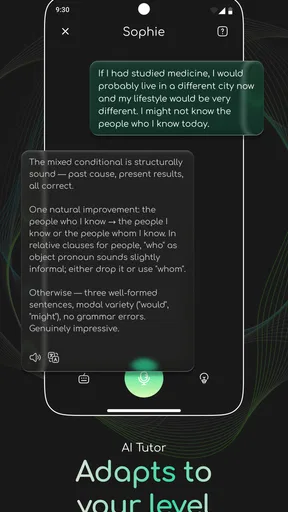
Our Review of TutorMe: AI English Learning
 Analysis by Appyee
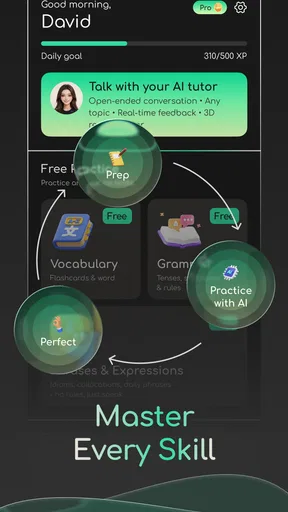
I found TutorMe: AI English Learning most interesting as a low-pressure way to practise English in small, repeatable moments. It is an education app from Generous Tech Inc., and its basic idea is easy to understand: instead of treating English practice as a stack of exercises, it puts chatting at the centre. That makes it feel closer to rehearsing a real conversation than completing another worksheet.
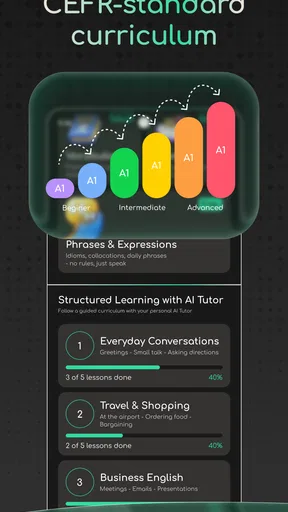
My overall impression is positive, but with an important qualification. This is best viewed as a conversation-practice companion, not a complete English course. It can help you get used to forming replies, noticing gaps in your vocabulary and becoming less hesitant, yet it should not be your only tool if you need structured grammar progression, exam preparation or detailed human correction.
How the app feels to read and navigate
The strongest part of the concept is its low mental entry cost. When I open an app for language learning, I do not always want to choose a lesson, review a rule and complete several exercises before speaking. A chat-based approach can remove that friction. You can focus on what you want to say rather than on navigating a large curriculum.
That simplicity matters for learners who become overwhelmed by crowded learning platforms. Someone returning to English after a long break may find a conversation less intimidating than a page full of grammar labels. Likewise, a learner who already understands written English but freezes when replying can use short exchanges as a bridge between passive knowledge and active use.
I would still recommend taking a moment to decide what you want from each session. Without a clear purpose, conversational practice can become pleasant but unfocused. Before starting, choose one small target: describing your morning, asking for help in a shop, explaining a work task or practising past-tense answers. That turns an open chat into a manageable exercise.
The app’s store presence identifies it simply as TutorMe, while the full product name makes its purpose clearer. It is aimed at English learning rather than general conversation, so I would approach it with a notebook or notes app nearby. Writing down two or three expressions that you actually wanted to use is likely to produce more lasting value than merely reading the replies and closing the session.
Its audience is broad. The content rating is Everyone, and the app is free, which makes trying it less of a commitment for families, casual learners and people who are unsure whether conversational practice suits them. It has reached over one hundred thousand installs and holds a 4.5 average from around two thousand ratings, so it is not an obscure experiment with no visible user interest. Those figures suggest a useful level of adoption, although they do not guarantee that its teaching style will match every learner.
Making text easier to manage
Chat-based learning can support readability because information arrives in smaller pieces. Instead of confronting a long lesson, you deal with one prompt and one response at a time. For learners who find dense educational screens tiring, this can make practice feel more approachable. I also like the possibility of rereading a reply before answering, something that is harder to do in a fast spoken conversation.
There is a trade-off, though. Short messages can hide the larger learning structure. A learner who needs a clear sequence from beginner grammar to more advanced usage may not know whether a conversation is building skills in a deliberate order. I would therefore use the app alongside a simple personal plan: choose a weekly topic, keep a running vocabulary list and revisit mistakes instead of moving endlessly from one fresh exchange to another.
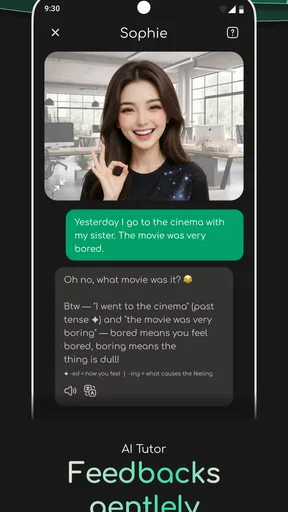
For people with dyslexia, attention difficulties or limited confidence, conversational pacing may be less stressful than timed drills. However, the benefit depends on how easy it is to distinguish the learner’s message, the tutor’s response and any correction or explanation. If those elements are visually similar, reviewing an exchange may take extra effort. I would not assume that a clean-looking chat is automatically accessible; what matters is whether the learner can quickly locate the correction, understand why it matters and continue without losing the thread.
Motor and sensory considerations
Typing is the most obvious physical demand in a chat-based English app. For users who type slowly, have limited hand mobility or rely on an alternative input method, a long conversation may become tiring. The practical workaround is to keep replies short at first. A sentence or two is enough to practise word order, tense and natural phrasing. The goal is not to produce an essay every time the app asks a question.
This short-response approach also helps beginners who do not yet have enough vocabulary for extended answers. I would rather write three accurate sentences and review them than struggle through a paragraph while missing the useful feedback. It creates a repeatable routine: answer, inspect the correction, rewrite one sentence and then continue.
Users with visual sensitivities or reading fatigue may prefer brief sessions rather than trying to complete a long chat in one sitting. A useful routine is to practise for a few minutes, pause, and return later to reread the exchange. That is not just a comfort measure; spacing out review can make it easier to notice recurring mistakes. Still, the app should not be treated as automatically suitable for every sensory need. Individual preferences around text size, contrast, motion and screen-reader interaction can vary, and I would test the interface personally before relying on it for daily study.
For learners who are hard of hearing, a text-first conversation can remove one common barrier found in speaking and listening courses: the need to catch every sound in real time. You can process written English at your own pace. On the other hand, text conversation does not replace listening practice. Someone preparing for travel, customer service or a spoken interview will eventually need audio exposure and live speaking opportunities elsewhere.
That distinction is important because confidence in typing can create a false sense of readiness. I may know how to write a polite request and still struggle to understand a quick reply aloud. TutorMe can help me prepare the language, but I would pair it with videos, recorded dialogues or conversations with people if listening comprehension is one of my goals.
A practical routine for different energy levels
One of the more useful ways to adapt the app is to match the session to your available energy. On a busy day, I would use a “micro-session”: answer one prompt, save one phrase mentally and stop. On a calmer day, I would ask follow-up questions, rewrite awkward sentences and deliberately use a new expression twice. This makes the app more realistic for people balancing work, study, family responsibilities or fluctuating concentration.
For someone with limited motor stamina, the micro-session also reduces repetitive typing. For someone with anxiety, it creates a predictable exit point. For someone who wants more challenge, the longer session can focus on explaining an opinion rather than giving simple factual answers. The same chat format can therefore serve different users, but only if the learner actively controls the size and difficulty of the task.
Situational access in everyday life
The app makes the most sense when you connect it to a situation you expect to face. Imagine that I am preparing for a hotel stay in an English-speaking city. I can practise checking in, asking whether breakfast is included, explaining a problem with a room and requesting directions. The value is not just memorising isolated phrases; it is getting used to responding when the conversation changes slightly.
Another realistic use is workplace preparation. Before a meeting, I could practise introducing a project, disagreeing politely or asking someone to clarify a deadline. I would not rely on the app to teach specialist terminology without checking it elsewhere, but it can help me make ordinary sentences feel more automatic. That is especially useful when I understand a topic well in my first language but hesitate when speaking English.
Parents and older learners may also appreciate the informal format. A learner can practise describing a recipe, talking about a favourite television show or explaining a daily routine without needing to commit to a formal class. Because the app is free and rated for Everyone, it is easy to suggest as a starting point to someone who is curious but not ready to pay for tutoring.
However, “free” does not mean cost-free in terms of attention. The real investment is consistency. If I open it once, have an entertaining exchange and never review anything, the learning effect will be limited. I would get more from it by returning to the same practical theme several times and gradually making my answers more detailed.
The app is also a reasonable option for learners who dislike being corrected publicly. Private text practice can provide a gentler rehearsal space before joining a class or speaking group. That can be particularly helpful for people who have had embarrassing experiences with pronunciation or grammar. Yet a private chat cannot fully reproduce the pressure, interruptions and misunderstandings of real conversation, so it should be a stepping stone rather than a permanent substitute.
Where alternatives may be stronger
Compared with a traditional textbook, TutorMe feels more responsive and easier to fit into spare moments, but it offers less visible structure. A textbook is better when I want a carefully ordered explanation of verb forms, sentence patterns and exercises that build on one another. Compared with a flashcard app, it offers more context and encourages active replies, while flashcards may be better for memorising a large set of words efficiently.
A human tutor remains the stronger choice for nuanced pronunciation feedback, cultural detail, personalised correction and accountability. A classroom adds interaction with several people, which matters if your goal is to handle different accents or spontaneous group discussion. TutorMe is most useful between those experiences: it gives me a place to rehearse before a lesson and continue practising after one.
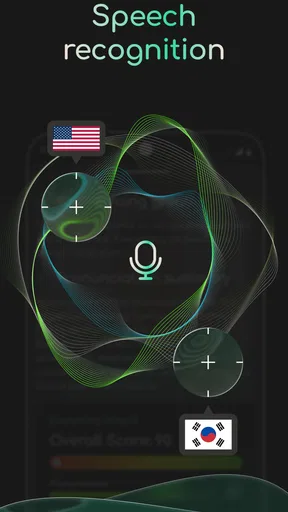
It is less suitable for a learner who needs a formal syllabus, a recognised qualification or a clear record of progress toward an exam. It may also disappoint someone looking primarily for pronunciation training, because written conversation cannot show every issue with stress, rhythm and individual sounds. In those cases, a course with audio, a speaking coach or a structured exam platform would be a better main resource.
Barriers that still affect the experience
The central limitation is that natural conversation is not the same as comprehensive teaching. A helpful reply may keep a chat moving without explaining every error in enough depth. If I do not stop to ask why a phrase sounds better, I may repeat the same mistake later. My advice is to treat corrections as material for review, not as information to skim once.
Another barrier is learner uncertainty. Beginners may not know whether their sentence is wrong because of grammar, word choice or an unnatural expression. More advanced learners may want subtle distinctions that require context and cultural explanation. In both cases, I would verify important language with a trusted reference or teacher rather than assuming that every suggested wording is the only correct option.
There is also a motivation problem built into open-ended practice. A structured course tells me what to do next; a chat can leave me responsible for choosing the topic, judging difficulty and deciding when I have improved. That freedom is useful for independent learners but frustrating for people who need firm guidance. A weekly checklist solves part of the problem: select three situations, practise each one twice and record the sentence you improved.
Version 1.2.0 is the current version, and the minimum operating-system requirement is Android 7.0 or later. That makes the app approachable for many Android users, but device compatibility is still something I would check before planning a long study routine. A learner using an older phone should pay attention to how comfortably the screen handles extended reading and typing, not just whether installation is possible.
I would also avoid judging the app solely by its 4.5 average or its popularity. Around two thousand ratings and over one hundred thousand installs show that many people have tried it, but ratings compress very different expectations into one number. Someone seeking casual practice may be delighted, while someone expecting a full academic course may feel that the experience is too open-ended.
My inclusive verdict
I recommend TutorMe for learners who want a friendly place to practise written English without the pressure of a live class. Its conversational design can support people who need smaller reading chunks, flexible timing or a private rehearsal space. The free price and Everyone age rating make experimentation easy, and Generous Tech Inc. has positioned the app around a clear everyday need rather than an intimidating study system.
My strongest recommendation is to use it deliberately. Keep replies short when typing is tiring, choose scenarios that reflect your real life, reread corrections and return to the same topic until your wording becomes easier. If you need listening, pronunciation, exam preparation or a complete grammar path, add another resource instead of expecting this one app to cover everything.
The best reason to try it is not the promise of effortless fluency; it is the chance to make English replies feel less unfamiliar. Used as a regular practice space, it can help turn knowledge into action. Used without review or a clear goal, it may remain an enjoyable chat with limited progress. For me, that makes it a worthwhile starting point and a useful companion, provided I understand exactly where conversation practice ends and broader language learning begins.
Verdict
Strengths of TutorMe: AI English Learning
- Personalized AI practice adapts exercises to your English level.
- Instant feedback helps identify grammar, vocabulary, and pronunciation mistakes.
- Short lessons make it convenient to study during spare moments.
- Interactive conversation practice builds confidence in everyday English.
- Progress tracking helps maintain motivation and monitor improvement.
Limitations of TutorMe: AI English Learning
- Some advanced features may require a paid subscription.
- AI feedback can occasionally misunderstand context or intended meaning.
- A stable internet connection may be needed for several learning tools.
- Practice quality depends on the accuracy of your answers and prompts.
- It may not fully replace structured lessons with a qualified teacher.
Similar Picks in This Category
View All
Duolingo: Language Lessons
Duolingo4.7

Google Classroom
Google LLC2.8

Unacademy: Learn & Crack Exams
Unacademy3.2

Bible App for Kids
Life.Church4.4

Cake - Learn English & Korean
Cake Corp.4.7

Brainly: AI Homework Helper
Brainly4.5
Frequently Asked Questions
What is TutorMe: AI English Learning, and who is it designed for?
TutorMe: AI English Learning is an AI-powered language practice app designed for learners who want to improve their English through guided conversations, explanations, and interactive exercises. It can be useful for beginners, intermediate students, and more advanced users who want extra speaking or writing practice. The app is especially convenient for people who prefer flexible, self-paced lessons instead of following a fixed classroom schedule.
What English skills can I practice with TutorMe?
TutorMe generally focuses on practical English development, including vocabulary, grammar, sentence construction, reading, writing, and conversational practice. Depending on the available activities and your selected level, you may be able to ask questions, practice everyday dialogues, receive corrections, and review difficult topics. It works best as a regular practice companion, although learners preparing for formal exams may still need specialized preparation materials.
Does TutorMe provide accurate corrections and explanations?
The app’s AI tutor can offer quick feedback and explain common grammar, vocabulary, and phrasing mistakes in a conversational way. However, AI-generated answers may occasionally be incomplete, overly general, or unsuitable for a particular context. For that reason, users should treat the feedback as helpful guidance rather than an absolute authority, especially when studying advanced grammar, professional English, pronunciation, or region-specific expressions.
Is TutorMe: AI English Learning free to use?
Availability of features may depend on the app’s current free plan, premium options, or subscription structure. Basic access may allow users to try selected lessons or conversations, while additional practice tools, longer sessions, advanced feedback, or unrestricted usage could require payment. Before downloading or subscribing, review the pricing page, trial conditions, renewal terms, and cancellation instructions shown in the official Android or iOS store.
Can TutorMe replace a human English teacher or language course?
TutorMe can be valuable for frequent practice because it is available on demand and can respond immediately to many learner questions. Nevertheless, it should not be considered a complete replacement for a qualified teacher. A human instructor can evaluate progress more deeply, identify recurring learning problems, explain subtle cultural meaning, and provide structured accountability. Combining the app with real conversation and organized study usually produces better results.
